
Vault has a new design. Your videos, cameras, users and settings stay as they are, and nothing is moved or deleted. We switch your organisation over for you.
Please note: We're rolling out the new Vault to organisations in stages, so you may not have it yet. See Which Vault am I using? to check.
Finding your way around
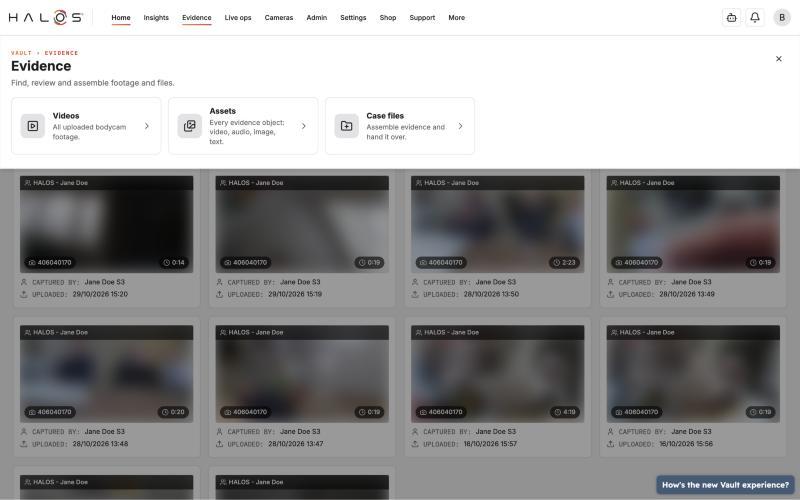
The menu down the left side is replaced by a menu across the top. Each area opens a panel with the pages inside it. You only see the areas your role can use.
| Menu area | What you'll find |
|---|---|
| Home | Your own home page, built from the widgets you choose |
| Insights | The usage and compliance dashboard |
| Evidence (or Jobs) | Your videos, other files and case files. The names match how your organisation works, for example Jobs Recorded and Job Files |
| Live ops | Livestreams, Control Center and Live map |
| Cameras | Your cameras, who has them, and their status |
| Admin and Settings | Organisation and account settings |
What's new
- Your own home page. Choose which widgets to show, such as unassigned cameras, videos uploaded or live streams. Click one to open the detail. Your layout is saved to your account, so you see it on any computer.
- Shareable links. Filter the videos list, the cameras list, the live map or the dashboard, then copy the link. A colleague who opens it sees the same view.
- One page per video. The player, details, clips, snapshots, bookmarks, transcript, map and audit log are all on one page.
- Work on many videos at once. Mark as evidence, add to a case file, or download a whole selection.
- See how long a video will be kept. A badge shows the days left before its retention date.
- Camera list. Assign a camera directly from the list, rather than opening the camera's page.
- A live map with a camera list beside it. Search, filter by team and watch a live camera without leaving the map.
- Light and dark mode, saved to your account.
Still in the classic pages for now
A few things still open the classic pages. Vault takes you there automatically, and anything you do there shows in the new pages too.
- Uploading files, archived videos, importing metadata, and batch editing or exporting metadata.
- Seeing where a camera has been (journey history on the live map).
- Some admin settings, such as teams and notification settings.
Questions
Will my links and bookmarks still work?
Yes. Most open the new page. A few, such as a link to a single video or camera, open the classic page, which still works.
Who can use what?
Everyone sees the same videos and cameras as before. Some features, such as camera status, talking to wearers, the live map, remote control and transcripts, are switched on by HALOS Support for organisations that include them. Ask your org admin to contact us if you need one.
Something isn't working or I can't find a page.
Contact HALOS support with the page link from your browser and a screenshot.