
Please Note:
- This feature is only available on Horizon cameras and limited to Enterprise customers
-
When OBA is enabled, users can only be assigned via the camera. Any manual user assignments made in Vault will not override an OBA-assigned user, as the camera will automatically reassign itself back to the OBA user. For this reason, all user assignments should be managed exclusively through OBA while it is enabled. If you want to disable this feature, please reach out to support.
What is On-Board Assignment (OBA) ?
OBA or On-Board assignment is a Horizon feature that allows users to be quickly assigned to cameras directly from the device. This makes it easier for you to manage changes and updates in real-time.
The below guide assumes that you have already added your user's details to HALO Vault (this permission is restricted to supervisors). When adding users on HALO Vault, please ensure that the 'Logon Name' field is filled out, otherwise the user will not appear in the camera assignment list.
To use the On-Board Assignment (OBA) feature on your body camera:
- Turn on your body camera by pressing down the power button for 3 seconds
- Hold the P and FN button together for 5 seconds. The camera will vibrate and the screen will display a menu page with two options:
- RFID/NFC Card
- On-Board Assignment
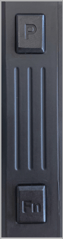
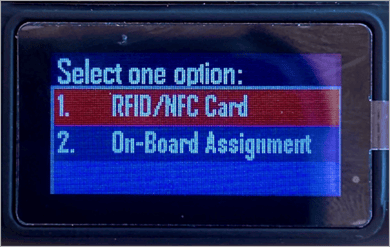
- Select the On-Board Assignment option, use the:
- P button to navigate up
- FN button to navigate down
- Front record button to select.
- Hold P + FN together for 5 seconds to exit the menu
- Once selected, the screen will show a prompt to enter a password as shown below (this is set by HALO Admin):
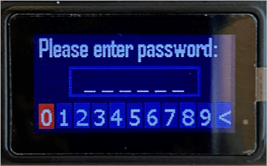
- Enter the 6 digit password using the P button to navigate left, FN button to navigate right and front record button to select. If successfully entered, this will automatically bring you to the User List

- Press the FN button to scroll down, P button to scroll up the list and front record button to select the user. The camera will vibrate and User Assigned
 will be shown on the screen
Note: If the user list has been recently updated on Vault, go to the menu page for RFID and On-Board Assignment menu option on the camera. This will run a script to download the latest user list.