
💡 Tip! Once your camera is turned on, you can brighten the screen display by tapping the power button again on the side of your camera
The below table provides a description of each symbol on the LCD screen of your Horizon S3 camera
|
Wi-Fi connected |
 |
| Wi-Fi disconnected |  |
| 4G connected |  |
| GPS connected |  |
| GPS signal low |  |
|
Record counter (Hours : Minutes : Seconds) |
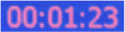 |
|
Battery level |
 |
|
Charging complete |
 |
|
Recording resolution e.g. 1080P means 1920 x 1080 |
 |
| Pre-recording ON |  |
| Bluetooth ON |  |
| Bluetooth connected |  |
| Connected to computer via USB |  |
| Files uploading / Total files to upload |  |
| File upload progress |  |
| Remaining storage / Total storage (GB) |  |
| Storage full |  |
| Offline ethernet connection |  |
| Online ethernet connection |  |
| WPS active |  |
| Livestream active |  |