
To use the API, your organization will need API keys. These are provided by the HALOS engineering team to your engineers. If you'd like to request API keys, please make sure you are the billing contact or primary contact for the account and raise a ticket with HALOS support.
The HALOS APIs are straightforward to work with. Every request carries a static API key; most requests also carry a short-lived access token that you obtain by authenticating. Once you have both, you can call any endpoint.
Two credentials
There are two separate credentials — don't confuse them:
x-api-key— a static key you've been issued. It goes on every request, including the/authrequest itself.- Access token — a bearer token you get back from
/auth. It goes on every request after authentication. It is valid for 1 hour; once it expires, call/authagain to get a new one.
Base URLs
Your base URL depends on which Vault you're on:
| Vault | Login URL | API base URL |
|---|---|---|
| UK Vault | https://app.halovault.cam | https://api.halovault.cam |
| US Vault | https://app.halovault.us | https://api.halovault.us |
All examples below use the UK base URL. If you're on the US Vault, swap api.halovault.cam for api.halovault.us.
Worked example: download a video uploaded by a camera
1. Authenticate to get an access token
POST https://api.halovault.cam/auth
x-api-key: <x-api-key>
Content-Type: application/json

{
  "key": "<key>",
  "secret": "<secret>"
}
The response contains your access token. Use it as the Authorization header on every subsequent call, as Bearer <access-token>.
2. List media to find the video you want
GET https://api.halovault.cam/media
x-api-key: <x-api-key>
Authorization: Bearer <access-token>
This returns a list of media items. Pick out the media_id of the video you want from the response. For a fleet of cameras this list can be large, so use the endpoint's filtering and pagination (e.g. by date, to narrow to yesterday's uploads) rather than pulling everything.
3. Get the file URL for that media item
GET https://api.halovault.cam/media/<media_id>/file
x-api-key: <x-api-key>
Authorization: Bearer <access-token>
This returns a URL pointing to the video file — not the raw bytes. Fetch that URL with a standard GET to download the video.
Confirm before publishing: does this URL expire? If it's time-limited, callers should fetch it promptly after receiving it, and we should state the lifetime here.
Swagger
The full set of endpoints is documented and testable in Swagger:
https://api.halovault.cam/swagger-ui/index.html
Using the Swagger interface
Swagger lets you run calls end to end — authenticate, then retrieve your data.
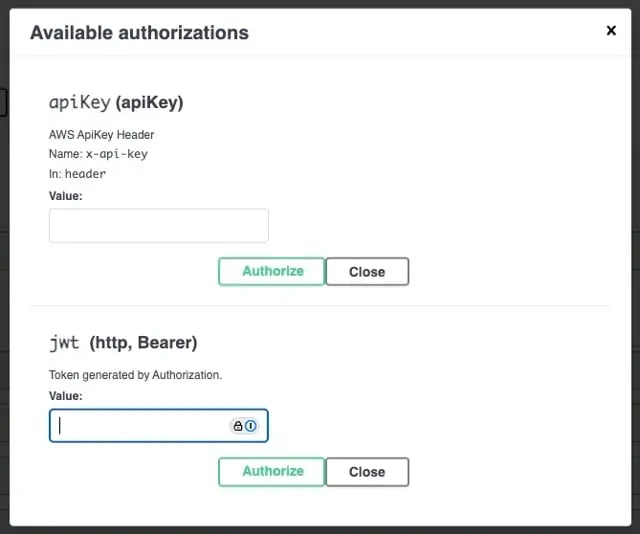
1. Set your API key. Every call needs the x-api-key you were issued. Press Authorize (top right), enter your key in the apiKey box, press Authorize next to it, then Close.

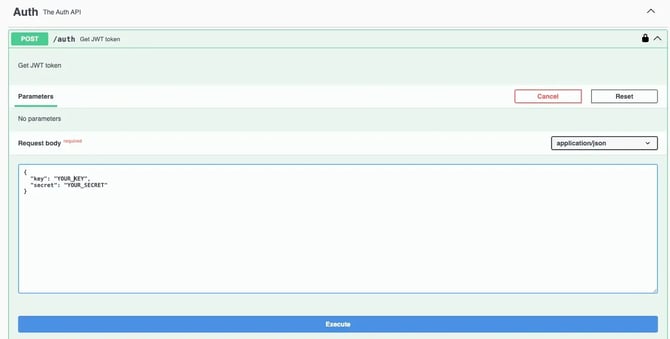
2. Generate an access token. Open the Auth section, select Try it out, enter your key and secret in the request body, and press Execute.
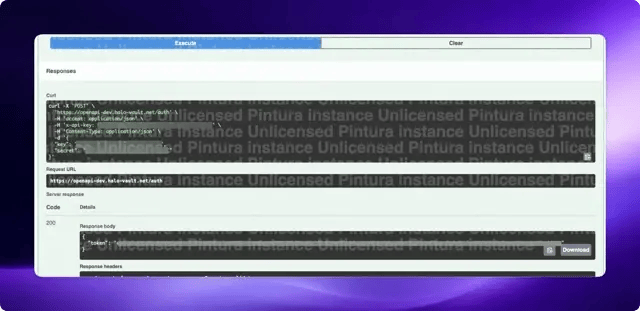
Copy the token value from the response (the string inside the quotes after token).
3. Authorize with the token. Open the Authorize dialog again, paste the token into the jwt box, and press Authorize.
With the API key and token both set, Swagger will send both with every call, and you can exercise any endpoint.
Errors and rate limits
- Bad key/secret returns 401 Unauthorized. An expired or missing access token also returns 401 — re-authenticate to recover.
- Rate limits: 1 request per second and 100,000 requests per month. The per-second limit is a burst ceiling. Sustained, 100,000/month works out to roughly one call every 26 seconds (about 3,333/day), so pace bulk jobs accordingly rather than assuming 1/sec is safe to run continuously.
Handling credentials
Camera footage can contain sensitive data, so treat these credentials as secrets:
- Never commit your
x-api-key,key,secret, or access tokens to source control or paste them into shared docs/tickets. - Only ever send them over HTTPS (all HALOS endpoints are TLS-only).
- Rotate anything that may have been exposed.